Compile and render#
Scenet is a library first: the scenet command is a thin wrapper over the functions this
chapter calls. Here you install it, compile a document in every form it comes in, and draw
the result with every renderer there is.
What you will build#
A script that turns documents into files: a panel compiled from a string and from a file, a sequence drawn as a strip, a page drawn as SVG and printed as PDF, a comic script, a panel built from Python objects, and the exports an image model reads. Each step prints what it made, so you can see it worked.
Every example on this page is a complete script. Save it as a file, in a folder of its
own, beside the documents the page asks you to save, and run it with python. What it
prints is shown under it.
Install#
pip install scenet
Or uv add scenet in a project of your own. Scenet needs Python 3.12 or later, and brings
its own fonts and its own two characters, Alice and Bob: nothing is looked up on your
system.
A panel from a string#
compile_source compiles a panel written in
the language, as text. It returns a
CompileResult, whose core is the
Panel Core: every position the compiler decided.
render draws a Core as SVG text.
from scenet import compile_source, render

result = compile_source("""
panel: {size: [800, 500]}
cast:
  alice: {reference: alice}
script:
  - say: {by: alice, text: "Compiled from a string."}
""")

svg = render(result.core)
print(svg.splitlines()[0])
print(len(result.core.balloons), "balloon")
<?xml version="1.0" encoding="UTF-8"?>
1 balloon
The SVG is complete and self-contained: lettering is drawn as glyph outlines, so no font has to be installed where it is opened.
A panel from a file, written to a file#
Save this panel as hello.panel.yaml:
panel: {size: [800, 500]}
camera: {shot: medium_shot}
cast:
  alice: {reference: alice, at: left_third}
  bob: {reference: bob, at: right_third, facing: left}
staging:
  - alice left_of bob
  - alice looking_at bob
script:
  - say: {by: alice, text: "Did you compile this?"}
  - say: {by: bob, text: "Every byte of it."}
compile_file reads it. A renderer returns
text, so writing a file is yours to do, and you choose where:
from pathlib import Path

from scenet import compile_file, render

result = compile_file(Path("hello.panel.yaml"))

out = Path("out")
out.mkdir(exist_ok=True)
(out / "hello.svg").write_text(render(result.core), encoding="utf-8")

print(sorted(path.name for path in out.iterdir()))
print([balloon.speaker for balloon in result.core.balloons])
['hello.svg']
['alice', 'bob']
Write SVG as UTF-8 with encoding="utf-8": the default encoding differs between systems,
and a balloon may hold any character.
Several panels, as a strip#
A scene holds several panels under panels:. One may be drawn over: another, taking its
cast and staging and changing only what it says. Save this as story.scene.yaml:
panel: {size: [700, 500]}
cast:
  alice: {reference: alice, at: left_third}
  bob: {reference: bob, at: right_third, facing: left}
staging:
  - alice left_of bob
  - alice looking_at bob
panels:
  wide:
    camera: {shot: full_shot}
    script:
      - say: {by: alice, text: "We need to talk."}
  close:
    over: wide
    camera: {shot: close_up}
    script:
      - say: {by: bob, text: "Must we?"}
compile_scene compiles a scene from text, and
compile_scene_file from a file. Both
return a dictionary of results, by panel name, in reading order.
render_strip draws them side by side:
from pathlib import Path

from scenet import compile_scene, compile_scene_file, render, render_strip

panels = compile_scene_file(Path("story.scene.yaml"))
print(list(panels))

for name, result in panels.items():
    Path(f"{name}.svg").write_text(render(result.core), encoding="utf-8")

strip = render_strip([(name, result.core) for name, result in panels.items()])
Path("story.svg").write_text(strip, encoding="utf-8")

same = compile_scene(Path("story.scene.yaml").read_text(encoding="utf-8"))
print(same.keys() == panels.keys())
['wide', 'close']
True
Pages, and print#
A scene with pages: lays its panels out on pages. Save this as page.scene.yaml:
page: {size: [1500, 1000], margin: 60, gutter: 30}
cast:
  alice: {reference: alice, at: left_third}
  bob: {reference: bob, at: right_third, facing: left}
staging: [alice left_of bob]
pages:
  - tiers:
      - panels: [{use: wide, width: 2}, close]
panels:
  wide:
    camera: {shot: full_shot}
    script:
      - say: {by: alice, text: "A page of our own."}
  close:
    over: wide
    camera: {shot: close_up}
    script:
      - say: {by: bob, text: "Two panels wide."}
compile_book compiles such a scene from text,
and compile_book_file any document from a
file, choosing by its name. Both return a Book: every
panel, compiled at the shape of its frame, and a
Page Core for each page.
Three renderers draw pages.
render_page draws one;
render_pages draws every page side by side, as
one SVG; and render_pdf prints every page, as PDF
bytes:
from pathlib import Path

from scenet import compile_book, compile_book_file, render_page, render_pages, render_pdf

book = compile_book_file(Path("page.scene.yaml"))
cores = {name: result.core for name, result in book.panels.items()}
print(len(book.pages), "page,", list(book.panels), "on it")

Path("page-1.svg").write_text(render_page(book.pages[0], cores), encoding="utf-8")
Path("spread.svg").write_text(render_pages(book.pages, cores), encoding="utf-8")

pdf = render_pdf(book.pages, cores, fonts=book.fonts, images=book.images)
Path("page.pdf").write_bytes(pdf)
print(pdf[:5])

again = compile_book(Path("page.scene.yaml").read_text(encoding="utf-8"))
print(list(again.panels) == list(book.panels))
1 page, ['wide', 'close'] on it
b'%PDF-'
True
The PDF is written with write_bytes: it is binary, and is the only renderer that returns
bytes. Its pages measure what page.size says, in tenths of a millimetre.
A comic script#
A comic script is the format writers already use: PAGE and PANEL headings, a line of
description, and dialogue. Save this as corner.script:
---
cast:
  ALICE: {reference: alice, at: left_third}
  BOB: {reference: bob, at: right_third, facing: left}
---

PAGE ONE

PANEL 1
@shot: full_shot
Alice and Bob meet on a street corner.

ALICE
You forgot your umbrella!

PANEL 2
@shot: close_up

BOB
I know.
compile_script compiles one from text, and
returns a Book as compile_book does. The front matter between the --- lines casts
its characters, by the names the dialogue gives them.
compile_book_file reads
a .script file too:
from pathlib import Path

from scenet import compile_book_file, compile_script

book = compile_script(Path("corner.script").read_text(encoding="utf-8"))
print(list(book.panels))
print([balloon.speaker for result in book.panels.values() for balloon in result.core.balloons])

print(list(compile_book_file(Path("corner.script")).panels) == list(book.panels))
['1', '2']
['ALICE', 'BOB']
True
Any document, its panels alone#
compile_document takes the path of a
panel, a scene or a comic script, chooses by the file’s name, and returns its panels
alone, as compile_scene does. It is the call to make when the reader of your program
chooses the file:
from pathlib import Path

from scenet import compile_document

for name in ["hello.panel.yaml", "story.scene.yaml", "corner.script"]:
    panels = compile_document(Path(name))
    print(f"{name}: {list(panels)}")
hello.panel.yaml: ['panel']
story.scene.yaml: ['wide', 'close']
corner.script: ['1', '2']
A single panel’s only result is named panel.
A panel built in Python#
The language is a set of Python models, and a document is one of them once it is read.
Build a PanelIR yourself, and compile it with
compile_ir:
from scenet import CastMember, PanelIR, PanelSpec, SayEvent, compile_ir, render

panel = PanelIR(
    panel=PanelSpec(size=(800, 500)),
    cast={"alice": CastMember(reference="alice")},
    script=[SayEvent(by="alice", text="Built, not written.")],
)
result = compile_ir(panel)
print(result.core.width, result.core.height)
print(result.core.balloons[0].lines)
print(render(result.core).startswith("<?xml"))
800.0 500.0
('Built, not', 'written.')
True
Each model checks its values as it is built: a bad one raises pydantic’s
ValidationError, at the line that built it.
The geometry, and exports for image models#
Two more renderers draw what the compiler decided rather than the panel.
render_debug draws its geometry: each
figure’s outline, the face zones no balloon may cover, the anchors, the gaze, the tails’
routes. render_conditioning draws the
staging for an image model, as a
Conditioning: a pose, boxes, a depth map, a
mask and a description of what the panel holds:
import json
from pathlib import Path

from scenet import compile_file, render_conditioning, render_debug

core = compile_file(Path("hello.panel.yaml")).core
Path("hello.debug.svg").write_text(render_debug(core), encoding="utf-8")

exports = render_conditioning(core)
pose = json.loads(exports.pose)
print(pose["canvas_width"], pose["canvas_height"], len(pose["people"]), "people")
semantics = json.loads(exports.semantics)
print(sorted(semantics))
800 500 2 people
['actors', 'camera', 'canvas_height', 'canvas_width', 'description', 'direction', 'figures', 'lettering', 'setting']
pose is OpenPose keypoints, boxes and semantics are JSON, and depth and mask are
SVG. Export for image models says what each holds.
What a renderer is handed back: fonts= and embed=#
A Core names the fonts it was lettered in, and the pictures it draws, by the digest of their bytes; it holds neither. What a compile read, its result returns, and a renderer is handed it back:
fonts=takesresult.fonts, orbook.fonts: every font the document declared. A Core lettered in a font of its own, drawn without it, raisesRenderErrorrather than letter in another face, which would not fit the balloons measured for it.embed=takesresult.images, orbook.images: the bytes of every picture the document named, written into the SVG. Without them, the SVG links each picture by the path the document wrote, which a viewer must find beside it.render_pdftakes them asimages=, and always prints them.
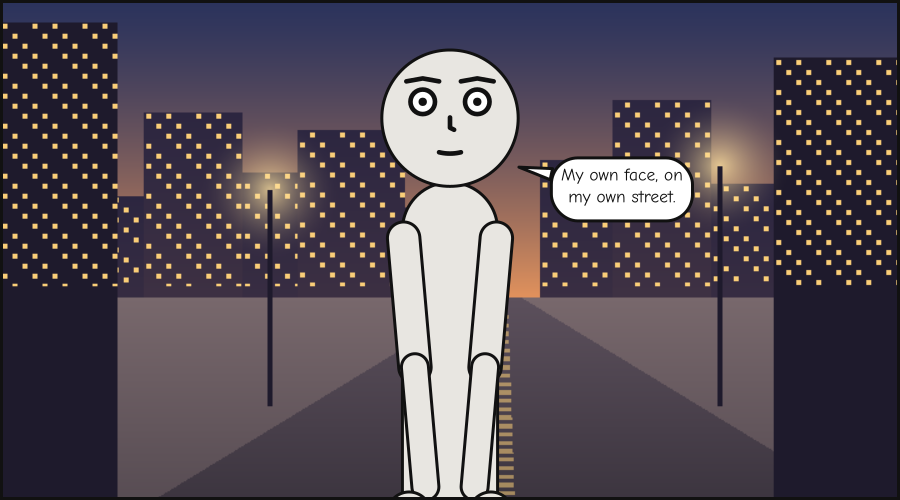
This document names a font and a picture, both from the gallery’s folders. Save it as
street.panel.yaml, with
fonts/ComicNeue-Regular.ttf
and art/street.png
beside it:
panel: {size: [900, 500]}
lettering: {font: fonts/ComicNeue-Regular.ttf}
setting: {image: art/street.png, fit: cover}
cast:
  alice: {reference: alice}
script:
  - say: {by: alice, text: "My own face, on my own street."}
from pathlib import Path

from scenet import RenderError, compile_file, render

result = compile_file(Path("street.panel.yaml"))
print(len(result.fonts), "font")
print(len(result.images), "picture")

try:
    render(result.core)
except RenderError as exc:
    print("RenderError:", exc)

linked = render(result.core, fonts=result.fonts)
embedded = render(result.core, fonts=result.fonts, embed=result.images)
print('href="art/street.png"' in linked, "data:image/png;base64," in embedded)
1 font
1 picture
RenderError: this panel was lettered in Comic Neue Regular (sha256 a0ee5a37c8b2), and that font was not given to the renderer; pass the fonts its compile returned as `fonts=`
True True
What you learned#
One compile per form a document comes in.
compile_source,compile_fileandcompile_irmake one panel;compile_sceneandcompile_scene_filea dictionary of them;compile_book,compile_book_fileandcompile_scriptaBook, with pages; andcompile_documentthe panels of any file.Seven renderers, each reading a Core and nothing else.
render,render_debug,render_strip,render_page,render_pagesandrender_conditioningreturn text;render_pdfreturns bytes. Writing them to files is yours to do.A renderer is handed back what the compile read: its fonts as
fonts=, and its pictures asembed=, orimages=for print.
Where to go next#
Read what it decided: what a Panel Core holds, and what you can do with it.
The Python reference has a page for each function here, with every argument, what it raises and the release it appeared in.
The author’s tour teaches the language your documents are written in.